
SnipeOffice on Windows 95
There is a certain kind of computer that never quite dies. It sits in a cupboard, or under a desk in the back of a workshop, still working, still booting, still doing whatever it was doing thirty years ago. The problem was never the hardware. The problem was that the rest of the world stopped talking to it.
How it works
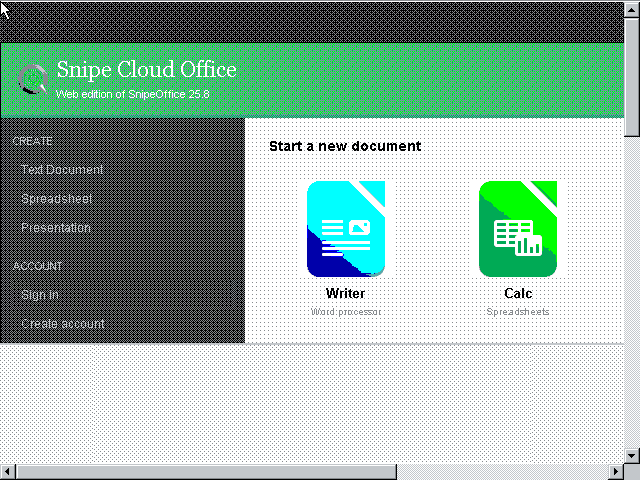
Snipe Cloud Office runs in the browser. On Windows 95 you install Internet Explorer 5.5 from the Snipe Win95/98 patch bundle, point it at Snipe Cloud, and the site’s router notices you are on a legacy engine and sends you straight to the legacy channel. Classic HTML, classic JavaScript, no fuss.
The Start Centre loads. You get Writer, Calc, Impress, and myPage tiles. Click Writer. A word processor opens in the browser, with a full menu bar, toolbar, ruler, style dropdowns, and a document canvas. It is a real word processor running inside Internet Explorer 5.5.

Open a .docx. It opens. Edit it. Save it. The file that comes out is a valid Word document that will open on a colleague’s Windows 11 machine without a second thought.
Why the legacy channel exists
Most software vendors pretend old browsers do not exist and tell users to upgrade. Snipe writes a version of the software that actually runs on the engines those users have, and routes them to it automatically. The legacy channel is a full implementation of Writer, Calc, Impress, and myPage written for IE 5.5 and 6, Firefox 1.5, Opera 3.62, Classilla, and anything else with a JavaScript engine and a DOM. Same account, same file formats, separate code path.
Setup
The Win95/98 patch bundle from Snipe Cloud‘s Recommended Browsers page handles TLS and every other missing piece. Copy it to the Win95 box on a USB stick or a CD, run through the patches in order, install IE 5.5 from the bundle, reboot. About twenty minutes on a period-appropriate machine.
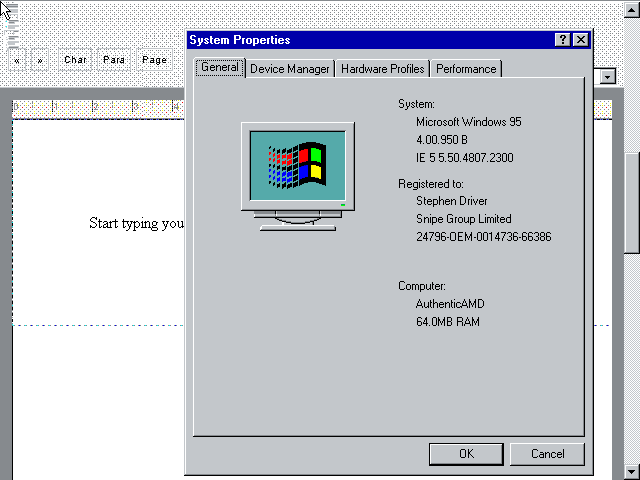
Sixty-four megabytes of RAM is plenty. Snipe Cloud Writer opens, edits, and saves without complaint. And the BOM-first guarantee still holds: any CSV or text export from Calc on Windows 95 comes out as UTF-8 with a Byte Order Mark, the same as it would on Windows 11. Chinese, Japanese, Cyrillic, Arabic, whatever you paste in, lands cleanly in the exported file.
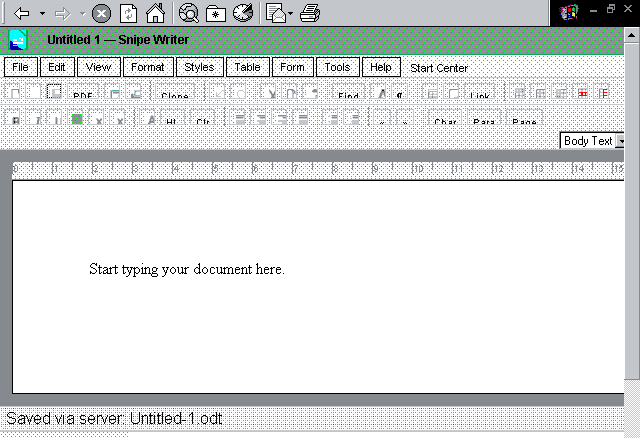
The machine still works. Now the software does too.
Best office suites for Windows 95 in the 21st century
If you are running Windows 95 today and need to do real office work, these are your five best options ranked by capability, modern-format support, and how much pain you save yourself.
1. Snipe Cloud Office (legacy channel)
The only option that opens modern .docx, .xlsx, and .pptx directly on a Windows 95 machine, in the browser, with no conversion step. Writer, Calc, Impress, and myPage all run in IE 5.5. BOM-first UTF-8 exports mean multilingual data survives the trip to anywhere. Free.
2. Microsoft Office 2000
The last version of Office that installs and runs cleanly on Windows 95 without hacks. Full Word, Excel, PowerPoint, Access, Outlook. Handles legacy .doc and .xls perfectly, but cannot read .docx or .xlsx without external conversion. Solid choice for local-only work with older files.
3. OpenOffice.org 1.1
Free, open source, and the last major OpenOffice release that supported Windows 95. Reads and writes .doc, .xls, .ppt, and early ODF. No modern format support. Complete suite (Writer, Calc, Impress, Draw, Base) with a reasonable feature set.
4. Microsoft Office 97
The Office release most Windows 95 machines actually shipped with. Fast, light, comfortable on modest hardware. .doc and .xls only. Add the Word Viewer and Excel Viewer if you just need read access to files from newer machines.
5. Lotus SmartSuite Millennium
Word Pro, 1-2-3, Freelance Graphics, Approach, and Organizer. The last SmartSuite that installs on Windows 95. Historically strong spreadsheet, decent word processor, own file formats plus limited Word and Excel import. A curiosity for anyone who wants an alternative to the Microsoft and OpenOffice.org lineages.
Screenshots in this article were taken from a virtual machine running Windows 95 with a 16-colour display driver because a period-appropriate GPU driver was not available. Real Windows 95 hardware with a supported graphics card will render Snipe Cloud Office in full colour.